Desktop Automation

Mail Merge Automation

Home / Projects / Mail Merge Automation
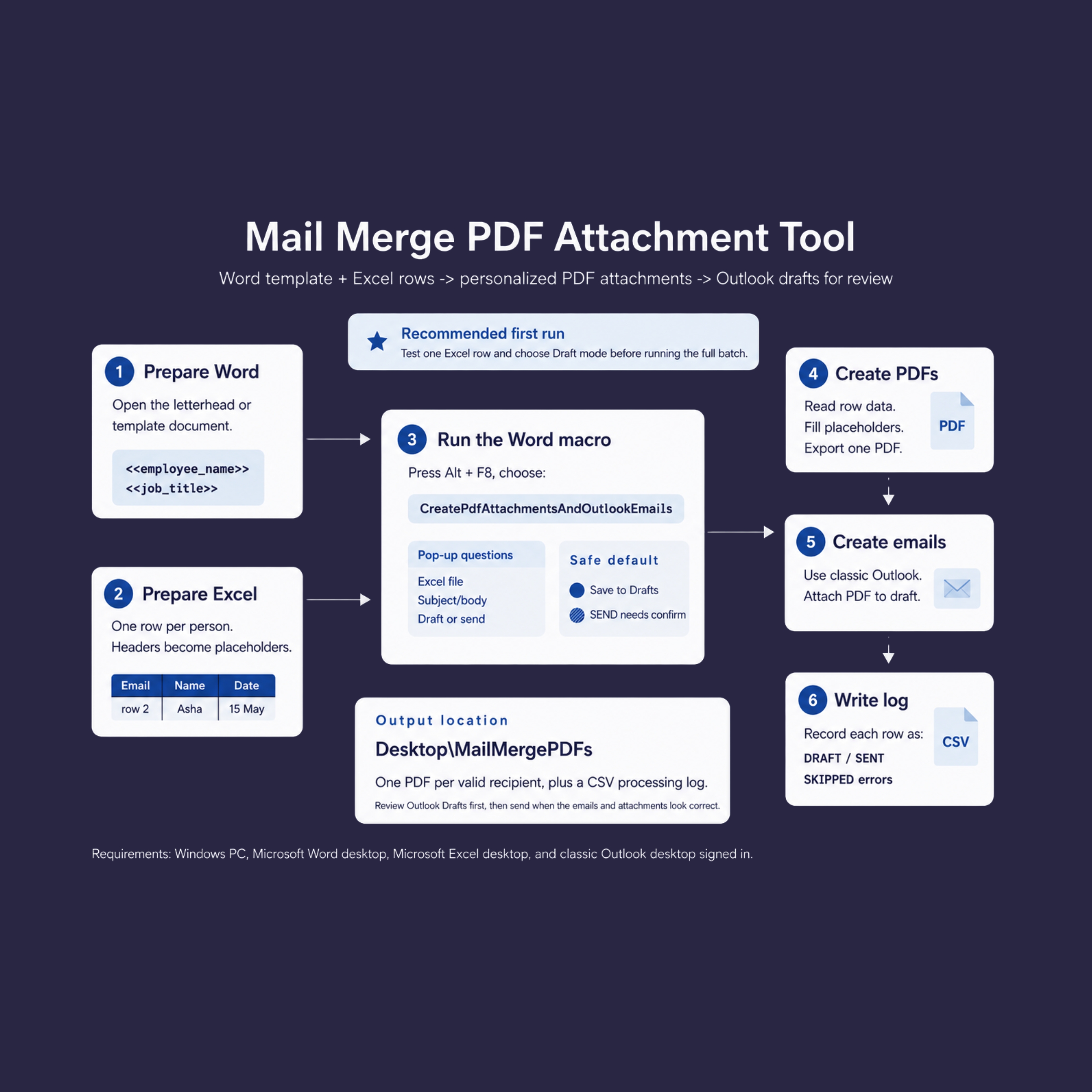
Mail Merge Automation workflow diagram
  • Category

    Desktop Automation

  • Who It's For

    HR, Admin & Operations Teams

  • Services

    Process Automation, Office Add-in Development

  • Year

    2026

Overview

A Windows desktop automation tool that reads recipient data from Excel, fills a Word template with personalized placeholders, generates one PDF per recipient, and creates Outlook email drafts with the correct subject, body, CC/BCC, attachments, and processing log.

The project demonstrates Microsoft Office automation, document generation, email workflow automation, PDF output, CSV logging, and practical business process automation.

01 The Challenge

A user needed to send personalized emails where each recipient receives a custom PDF generated from a Word template and Excel data. The original Outlook automation path failed on the client PC, even though PDF generation worked fine.

02 The Solution

FabNinjas built a Word VBA automation tool that reads Excel rows, replaces placeholders in Word, generates one PDF per recipient, and creates Outlook drafts (or sends after confirmation) with support for CC/BCC, subject, body, and attachment naming, plus a CSV processing log. The final version fixed the Outlook draft creation issue by switching to a simpler, more reliable Outlook COM path that avoids problematic MAPI readiness checks.

03 Key Features

  • Template-driven personalization — reads placeholders like <<employee_name>> from a Word template and fills them from matching Excel column headers
  • One row, one recipient — processes each Excel row independently and generates a unique, personalized PDF for every person
  • Automatic PDF export — fills the template and exports each personalized PDF straight to a dedicated output folder
  • Outlook draft creation — builds a draft email per recipient with the correct subject, body, CC/BCC, and the generated PDF attached, ready for review
  • Draft or send mode — defaults to a safe "save to Drafts" mode, with an explicit confirmation step required before anything is sent
  • One-click macro trigger — runs entirely from a single Word macro, prompting for the Excel file, subject/body, and draft-or-send mode
  • CSV processing log — records every row as Draft, Sent, or Skipped with errors, so nothing goes unnoticed

04 Technology

  • Platform: Windows Desktop Automation
  • Automation: Word VBA, Outlook COM
  • Data Source: Microsoft Excel
  • Output: PDF Generation, CSV Logging
  • AI-Assisted Development: Codex, Claude
Let's talk

Have a similar project in mind?

Get Consult